





Ask most IT providers what they charge, and you will get the same answer: “It depends. Let’s set up a call.” For a Los Angeles business owner trying to budget, that is not much help. Here is how managed IT pricing usually works, with a real published price list to compare against.
How Do Managed IT Providers Charge?
Most charge a flat fee per user, per month. That fee covers a defined bundle: monitoring, security tools, patching, backups, and often help desk support. Many also set a monthly minimum, so a very small office pays the minimum rather than the per-user rate. Work outside the bundle, such as a server migration or a new office build-out, is usually billed hourly or by project.
The details that change the final number are what is included, whether help desk is unlimited, whether cybersecurity is built in or sold as an add-on, and how long the contract locks you in.
A Real Example: One Provider’s Published Rates
Few providers publish their prices. Seal Beach-based HD Tech, which serves Los Angeles and Orange County businesses, does. As listed on its website in October 2026, all four packages are month-to-month:
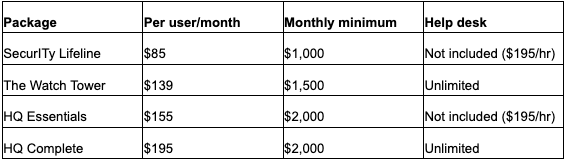
Project work outside the packages is billed at $195 an hour, or $293 after hours. Cybersecurity monitoring is included in every package rather than sold separately.
What Would That Look Like For A Real Office?
- An 8-person office on The Watch Tower: 8 × $139 is $1,112, which is under the minimum, so the bill is $1,500 a month.
- A 15-person office on The Watch Tower: 15 × $139 is $2,085 a month.
- A 40-person company on HQ Complete: 40 × $195 is $7,800 a month.
Why Do Providers Set A Monthly Minimum?
A managed IT provider has fixed costs for every client, no matter how small: security software licenses, round-the-clock monitoring tools, backup storage, and the engineers who respond to alerts. A minimum covers that baseline. For a business owner, it means the per-user rate only tells the full story once your headcount clears the minimum. Below that line, it makes more sense to compare the minimums themselves.
What Usually Costs Extra?
Even with a flat monthly fee, some work falls outside the bundle. Common examples are moving to a new office, replacing servers, migrating email to a new platform, or rolling out new software across the company. At HD Tech, that kind of project work is billed at $195 an hour during business hours and $293 after hours. Before signing with any provider, ask for a written list of what is covered and what is billed separately, and ask how after-hours emergencies are charged.
Does Contract Length Change The Price?
It can. Some providers ask for a multi-year agreement in exchange for a lower monthly rate, then charge a fee to leave early. Others, including HD Tech, run month-to-month, so the rate on the page does not depend on a long commitment. When comparing quotes, spread any setup or onboarding fee across the months you expect to stay, and read the cancellation terms before you sign. A provider that is confident in its service has less reason to lock clients in, and a business that outgrows its provider should be able to move on without paying to get out.
What Should You Compare When You Get Quotes?
- Is help desk unlimited, or billed by the hour?
- Is security monitoring included, and is it watched around the clock?
- Are backups tested, or just running?
- Is there a monthly minimum?
- How long is the contract, and what does it cost to leave?
A cheaper per-user rate can cost more once hourly help desk and security add-ons are counted. Lining up those five answers side by side is the fastest way to compare managed IT services in Los Angeles on equal terms.